
An Important Update to Your Life and AD&D Insurance Account(s)
To upgrade security and provide enhanced account features, SEIU Member Benefits has changed the administrator that services your Life and AD&D insurance plans.
If you are paying by credit card, you will need to update your payment information with the new administrator.
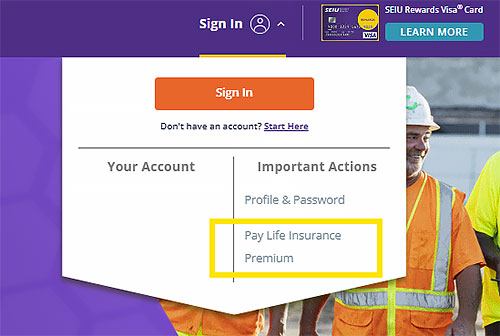
Use our new upgraded self-service portal to change your payment information. To do so, sign in to seiumb.com and click on the downward arrow next to your name. Click on “Pay Life Insurance Premium” and follow the prompts.
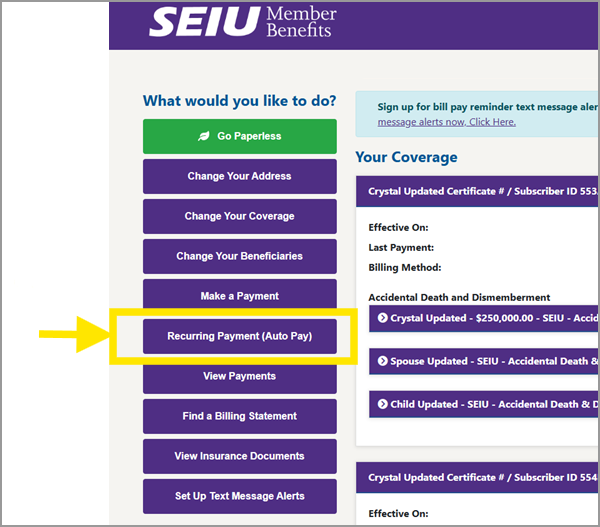
Once signed in, select “Recurring Payment (Auto Pay).”
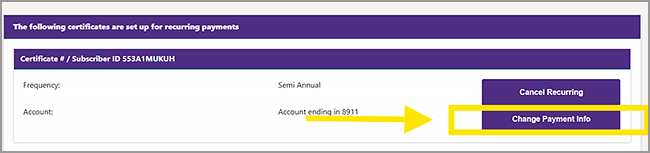
If you need to change an existing recurring payment, click “Change Payment Info.”
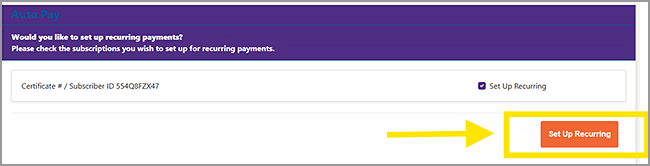
To set up a new recurring payment, click “Set Up Recurring.”
After you set up your recurring payments, you will receive a confirmation email once your request has been processed.
This platform upgrade does not alter your current insurance coverage, benefits or premium in any way. If you have questions, please Contact Us.
Your Questions, Answered
Here are some ways you can self-administer and make changes to your account:
- Make a payment
- Set up recurring payments
- Change address
- Request to adjust coverage
- Add or remove beneficiaries
- View online payment history
- Find a billing statement
- Choose paperless billing
- Sign up for text billing reminders
- Opt in to viewing online documents